

Building a product without testing it is a bit like cooking without tasting: it may work, but you risk missing what really matters. Digital tools are no different. If the applications we use every day are effective, it is because they are continuously tested to adapt to real-world usage.
User testing helps you validate assumptions before they turn into costly mistakes, and to focus your efforts where they have the greatest impact. In this article, we share our approach at Apptitude, the methods we use, when to use them and how to implement them to achieve concrete results.
During scoping, we validate a scope and goal before investing in design. During design, we adjust the structure, content and navigation before development. In production, we observe real-world usage to evolve the product over time.
The choice of method depends on what we are looking to learn: qualitative methods (interviews, observation, prototype testing) allow us to explore the why in depth, while quantitative methods (A/B testing, analytics, heatmaps, eye tracking, surveys) measure at a larger scale. Methods such as card sorting and tree testing help us understand how users organise information. For qualitative research, 5 well-targeted participants are often enough to identify the main points of friction; for quantitative research, larger samples are needed for reliable results. Before testing, we define a protocol (objectives, hypotheses, target profiles, process), and recruitment matters more than the number: it is better to have a few good profiles who closely match real users than a large but poorly targeted panel.
Once the tests are complete, the next step is to turn observations into decisions: identify patterns, prioritise what is frequent or blocking, and take action. AI can speed up the analysis, but it cannot pick up on what is left unsaid and does not replace human judgement.

Test what really matters, at the right time
User testing can take place at different stages of a project, depending on what we are trying to understand and the resources available.
Each phase raises its own questions and therefore its own opportunities for testing. The goal is not to test everything, but to focus on the most important elements: those that bring value or involve the most uncertainty.
For example, when designing a platform for preventing risks related to cannabis use, we focused our testing on the psychological questionnaire modules and the understanding of the content. Our main hypothesis was: “We believe that the instructions for the questionnaire modules are clear enough to allow users to complete them all the way through without friction.” Conversely, secondary elements such as the login process or the homepage were not tested, as they were not central to the subject.
Scoping phase: explore, learn
At the start, the main goal is to understand and define a direction. Initial ideas begin to take shape and need to be tested quickly.
Objective: validate a direction before investing further in the design.
What we observe: interest and desirability, overall understanding, perceived value and fit with a real need.
For example, for a company specialising in coffee machines, we tested an initial version of the concept incorporating NFC technology and a mobile application. The objective was to assess interest and understanding of the interactions between the phone and the machine, before investing further in the design.
Design phase: structure, refine
The project takes shape and the choices become more defined. This is the time to check that the design decisions are understood and relevant, before development. Depending on the project’s challenges, we can test the structure, content, interface and interactions.
Objective: adjust and refine to ensure a clear and usable experience.
What we observe: information findability, navigation logic, ability to find one’s way around, understanding of messages, ambiguities and interpretations, clarity of instructions, readability, visual hierarchy, perception of trust, visual accessibility (contrast, sizes, etc.), smoothness of user journeys, errors and misunderstandings, and accessibility of interactions (keyboard, gestures, etc.).
Production phase: observe, improve
The product is live and being used. Real-world feedback allows us to continue improving it over time.
Objective: understand real-world usage and continuously evolve the product.
What we observe: adoption and frequency of use, actual behaviours, workarounds, overall perception and maintaining accessibility over time.

Methodologies: choosing the right approach
There is no single method, nor a “best” approach. Each type of test has its strengths and limitations, and the choice depends above all on what we are looking to learn. Are we trying to understand a user’s behaviour in depth, or validate a trend on a larger scale? The answer to this question guides everything else.
At Apptitude, we generally combine several approaches depending on the project’s needs, to obtain both qualitative insights and measurable data.
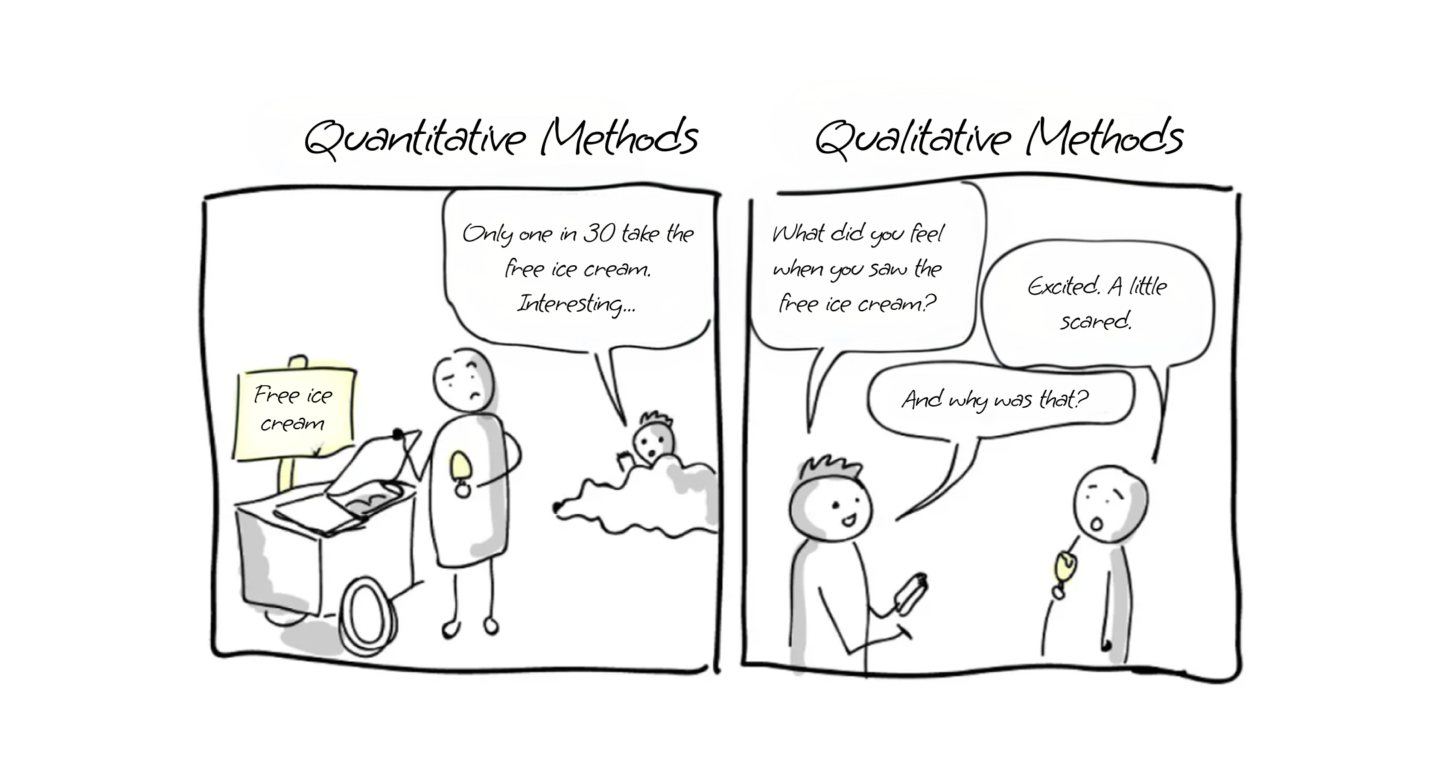
Qualitative or quantitative: two complementary approaches
Before choosing a method, it is useful to understand which approach we are taking. Qualitative approaches allow us to explore in depth what users do and, most importantly, why. Quantitative approaches measure and compare on a larger scale, using sufficient volumes to identify reliable trends. The two naturally complement each other: one provides understanding, while the other helps confirm it.
Moderated and unmoderated testing
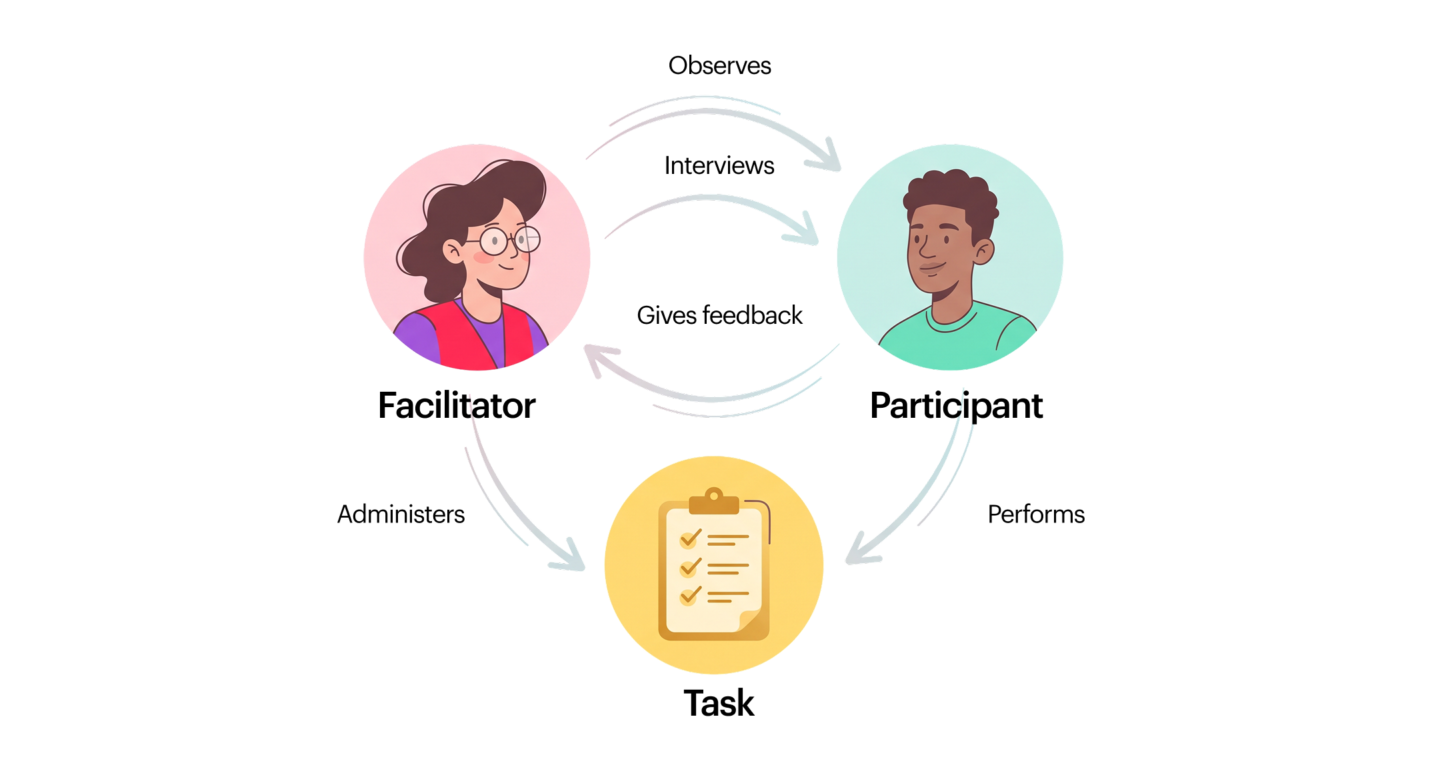
In both cases, we present the user with a scenario and observe their reactions, hesitations and misunderstandings. The difference lies in whether or not a facilitator is present. In a moderated test, the facilitator guides the session and can follow up on or explore a reaction further. In an unmoderated test, the user proceeds independently, from their own environment. The former offers greater depth, while the latter provides greater volume and flexibility.

Interviews
Individual interviews allow us to explore users’ needs, expectations and perceptions. They can be used, for example, to test the relevance of a concept, validate a direction before designing, or revisit what caused difficulties after a testing session. It is a simple method to set up, but it requires real rigour when conducting the interviews to avoid leading the answers.
Observation
Rather than asking users what they do, we observe them directly in their real-world environment. This approach reveals context-related behaviours that never appear in a typical testing environment: habits, workarounds and constraints that are invisible from a desk.
Structure and information architecture testing
Methods such as card sorting and tree testing help us understand how users organise information and navigate a product. They are particularly useful for testing a hierarchy or validating the logic of a menu before moving on to detailed design.
Prototype testing (or usability testing)
This is probably the method we use most often. It involves testing an interface, even an incomplete one, to assess its understanding, logic and ease of use before development. The advantage is that we can identify major issues very early, when they are still easy to fix.
As part of a recent project, we used Optimal Workshop to validate a critical flow in an application. The principle: give users specific tasks, then analyse the success data and the paths they took to complete them. This type of testing helps identify shortcuts that had not been anticipated, where users hesitate or get lost, or steps that seemed obvious but actually cause problems.

A/B testing
This method involves comparing two versions of an interface or feature to identify which performs better, based on real-world data. It is particularly useful in the production phase, when the aim is to optimise a specific element rather than understand overall behaviour.
Analytics
By analysing user journeys, conversion rates or drop-off points, we gain an objective view of what works and what causes problems. Analytics do not tell us why users behave this way, but they clearly indicate where to focus our investigation efforts.
Heatmaps
Heatmaps visualise areas of attention, clicks and scrolling on a page. They allow us to quickly see whether users are interacting with the right elements, or whether their attention is being drawn elsewhere. Combined with qualitative testing, they help confirm or refine what was observed during a session.
Eye tracking
We track users’ eye movements as they interact with an interface. This is a valuable method for identifying what attracts attention first, what is ignored, and what causes confusion, without the user needing to express it verbally. Particularly useful for testing dense interfaces or critical content.
Large-scale surveys
When we need to collect feedback from a large number of users, surveys help identify trends and validate perceptions at a scale that qualitative methods cannot reach.
Some tools for testing
- Heatmaps and analytics: Hotjar, Contentsquare
- In-person or remote interviews: Google Meet, Dovetail, Loop
- Information architecture testing: Optimal Workshop, Maze
- Surveys: Google Forms, Typeform
- “5-second tests”: Loop, 5 Second Test
- Prototype testing: Figma, Optimal Workshop, Lyssna
- Note-taking and transcription: Dovetail.
What is the right number of users?
This is a question that comes up often, and the answer always depends on the objective and the type of results expected.
Qualitatively: there is no need for large volumes to learn. In practice, 5 users can be enough to identify the majority of friction points. This rule, popularised by Jakob Nielsen, remains a good starting point, to be adapted according to the context.
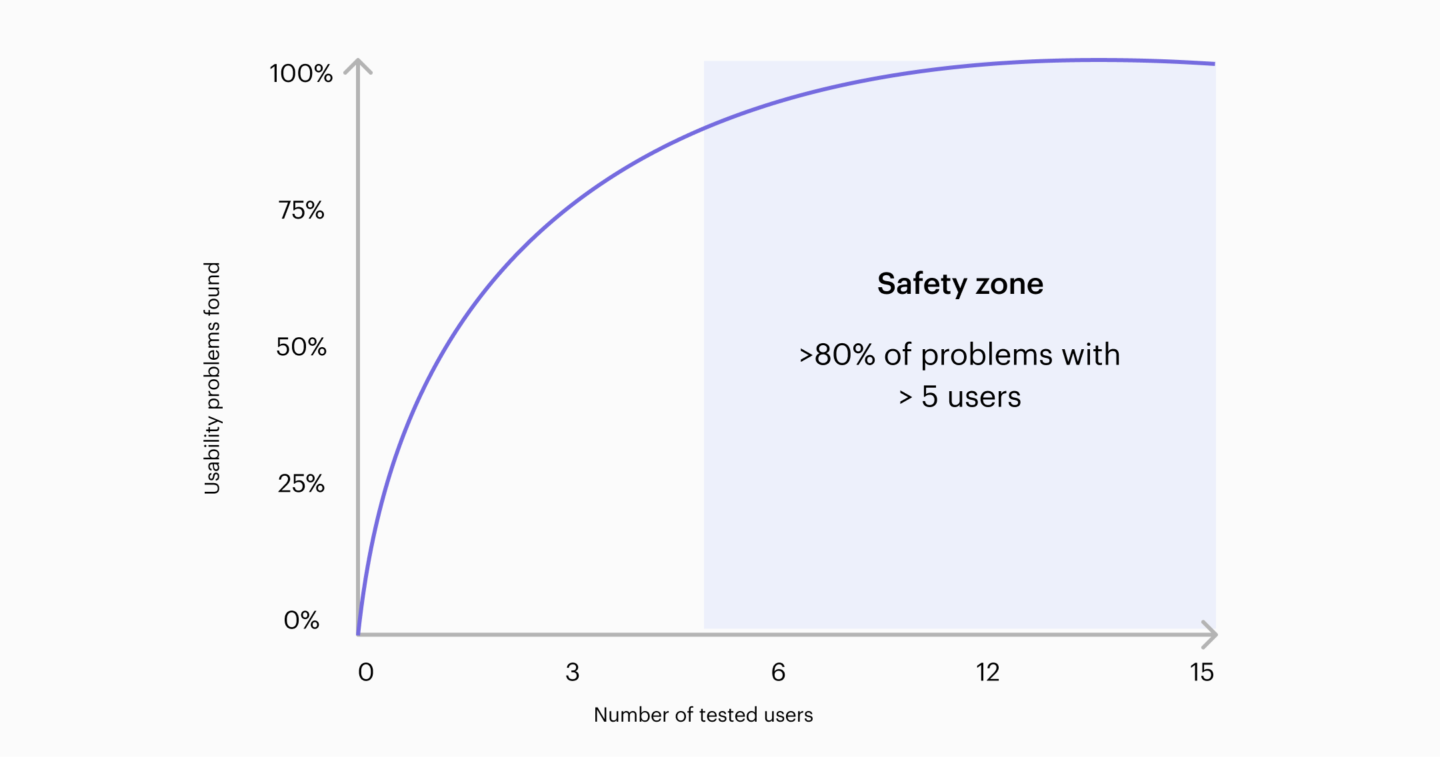
Quantitatively: the logic is different: the aim is to measure and validate on a larger scale, which generally requires larger samples to obtain reliable and representative results. There is no universal figure, but we can use a few rough benchmarks:
- ~30–50 participants: initial signals, early trends
- ~100 participants: more reliable results
- 100+: robust results, especially if segmented
Preparing before testing
Once the method has been chosen, the next step is to define a testing protocol. This is the session’s roadmap: a document that structures the test beforehand, serves as a guide for the moderator and provides a shared reference for the team, so that everyone knows what we are testing, why and how.
A good protocol specifies the objectives, the hypotheses to be validated, the profiles sought, as well as the session structure (tasks, questions, scenarios). It ensures consistent conditions from one test to another, makes the results comparable and prevents important elements from being overlooked.
User recruitment: a key factor in test quality
Good recruitment is not about volume, but relevance. A test with a small number of well-targeted participants will always provide more value than a large test with unrepresentative profiles.
This means targeting profiles that are close to real users, taking into account usage, context, level of expertise and motivations. Avoiding common biases: colleagues, friends, profiles that are too far removed or, on the contrary, too expert. Favouring homogeneous groups to better identify patterns. And anticipating absences by slightly over-recruiting or having backup participants.
How to recruit?
Existing customer databases
The most direct and often the most relevant source, as it allows you to recruit real users who are already familiar with the product or service. However, be careful to diversify profiles and avoid repeatedly approaching the same people.
Panels or recruitment tools
Platforms make it possible to recruit targeted profiles quickly, with the advantage of speed and precise targeting. The limitation: variable quality and participants who are sometimes “used to” taking part in tests.
Field recruitment
Through social media, forums, specialist groups or directly in the context of use. Profiles are often very close to reality, which is particularly useful for specific target groups. However, it is more time-consuming and less predictable.
Internally, with caution
Possible for very exploratory testing, but best avoided when the stakes are high, due to the knowledge biases and unrepresentative behaviours this can introduce.
Using the results: turning observations into decisions
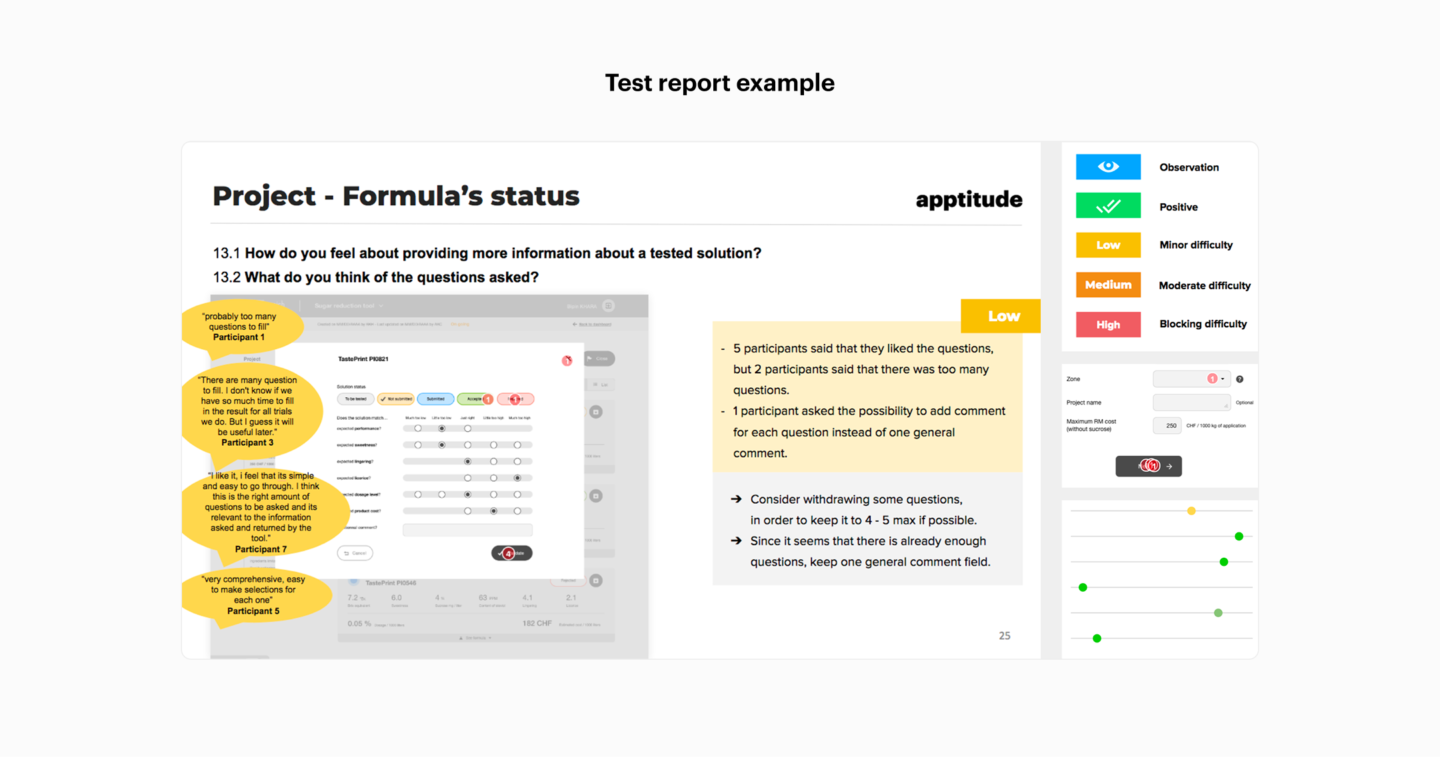
Once the tests have been carried out, the challenge is to turn observations into decisions. Tests do not provide ready-made answers: they provide signals that need to be analysed, prioritised and translated into concrete actions.
In practice, this means identifying patterns (recurring friction points, misunderstandings, similar behaviours), then prioritising problems, as not all feedback has the same impact. We prioritise what is frequent, blocking or risky for the project, before formulating concrete areas for improvement.
Not all feedback necessarily calls for an immediate fix, but some points are worth testing again after adjustments have been made. User testing reaches its full value through action: observing is not enough; we need to interpret, prioritise and act.
Even when conducted properly, user testing can be influenced by cognitive biases, both on the participant’s side and during analysis. Knowing about them helps us anticipate them and limit their impact. We have dedicated an article to this topic on our blog : Cognitive Biases & Design: When Our Brain Influences Design.
Gaining efficiency with AI
Analysing the results of a test takes time. Transcribing sessions, grouping observations, identifying patterns, writing an actionable summary: this is often where the process slows down. This is precisely where AI can help.
It allows large volumes of data to be processed quicker, recurring themes to be identified and initial summaries to be generated. It also makes it easier to present the findings by helping structure the results and bringing out trends that might otherwise have taken longer to identify.
But it has its limitations, and it is important to keep them in mind. AI does not pick up on what is left unsaid, hesitations or non-verbal communication. It does not replace a detailed understanding of the context of use, nor the judgement needed to prioritise what really matters. It remains a tool to support analysis, not a substitute for human judgement.
What you really gain from testing
There is often a gap between what we imagine and what users actually do. User testing helps to reduce it.
It is not about testing everything, all the time. The challenge is to focus on what brings the most value, depending on the context, objectives and resources available. In practice, testing is still often set aside due to a lack of time or budget. This is where tools such as those based on AI can play a useful role: by reducing the time spent on analysis, they make the process more accessible, even for projects with tight constraints.
Ultimately, testing is above all a way to make better decisions.
It is with this approach that our Design team supports its clients: asking the right questions, choosing the right methods and integrating user testing at the right stage of the project.